 Day by Dose
Plan around your schedule按自己的時間安排用藥
Set more than one time per day, repeat on selected weekdays, or pick specific dates on the calendar. Keep as-needed medication in the same list.可設定每天多個時間、指定星期,或從日曆選取日期。按需用藥也可以一起管理。
iPhone version 1.0 in testingiPhone 版 1.0 測試中
See which dose is due, get a reminder, and record it in one tap. If your records stop, Day by Dose can let a family member know.
看清楚這次要服哪一劑,到時間收到提醒,點一下就能記錄。如果連續漏記,也可以通知你選擇的家人。
For iPhone · iOS 18 or later適用於 iPhone · iOS 18 或以上版本
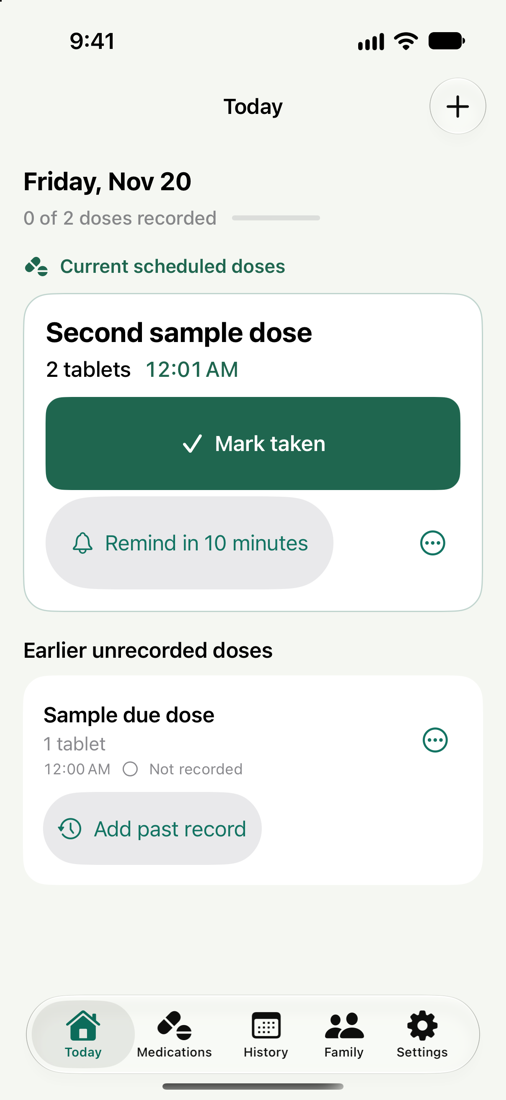
App preview with sample dataApp 示範畫面,使用測試資料
Set up your routine once. Open Today whenever you want to see what’s due.設定好用藥計劃,打開「今天」就知道目前是哪一劑。
Set more than one time per day, repeat on selected weekdays, or pick specific dates on the calendar. Keep as-needed medication in the same list.可設定每天多個時間、指定星期,或從日曆選取日期。按需用藥也可以一起管理。
Tap Mark taken, snooze the reminder, or record a skip. Undo an accidental entry. The Today widget brings the next dose to your Home Screen.可記為已服、稍後提醒或主動跳過,誤點也能撤銷。把「今天用藥」小工具放在主畫面即可快速查看。
Take a photo or choose one from your library, then check the suggested name and dose before you save.拍攝標籤或從相簿選圖,確認辨識出的藥名和用量後再儲存。
Review your dose history, track stock, and set refill reminders. Save an encrypted personal backup to Files for a future iPhone.查看用藥記錄、追蹤庫存、設定補藥提醒,也可把加密個人備份存到「檔案」供日後換機使用。
Invite a trusted person and confirm a test notification together. Once you turn on family alerts, they can be notified after two consecutive scheduled medication days without a record by default. You can change the number of days.邀請一位信任的家人,先確認測試通知。開啟家人提醒後,預設連續兩個計劃用藥日沒有記錄時通知對方,天數可自行調整。
How family alerts work了解家人提醒Invite a family member邀請一位家人Use Sign in with Apple to set up family alerts.透過 Apple 登入設定家人提醒。
Check the test notification確認收到測試通知Your family member confirms receipt on their iPhone.家人在自己的 iPhone 上確認已收到。
Decide when to alert設定通知的條件An alert reports a missing record. Your family can then check in with you.提醒顯示尚未收到用藥記錄,家人可以再聯絡你確認。
Your routine and records stay on your iPhone. Choose separately whether to use family alerts or export an encrypted backup.用藥安排和記錄保存在 iPhone。家人提醒和加密備份由你自行選擇使用。